@activities true
Remixing a Platformer Game - Adding a Static Enemy
Adding a Static Enemy
Getting Started @unplugged
In this tutorial we will add a static enemy to our platformer. If you want to understand more about how the starting code of the template works then you can follow this tutorial to create the game step by step.
About this Game Pattern
This game pattern is one of many you can add to your Platformer in this course.
-
Name: Add a Static Enemy
-
Description: Also known as a Hazard, a Static Enemy will kill or damage the health of the player if they touch it. These are often placed in tricky spots which the player is likely to bump into when jumping or trying to collect rewards.
-
Need for Pattern: Having hazards increases the challenge of a level, you can place hazards in a way that requires the player to time their jumps well and really control their movement.
-
Coding Concepts involved: Loops, Events
-
Links to other Computing Patterns: Change Listener, Input Event
namespace SpriteKind {
    export const Door = SpriteKind.create()
}
namespace myTiles {
    //% blockIdentity=images._tile
    export const tile0 = img`
        . . . . . . . . . . . . . . . .
        . . . . . . . . . . . . . . . .
        . . . . . . . . . . . . . . . .
        . . . . . . . . . . . . . . . .
        . . . . . . . . . . . . . . . .
        . . . . . . . . . . . . . . . .
        . . . . . . . . . . . . . . . .
        . . . . . . . . . . . . . . . .
        . . . . . . . . . . . . . . . .
        . . . . . . . . . . . . . . . .
        . . . . . . . . . . . . . . . .
        . . . . . . . . . . . . . . . .
        . . . . . . . . . . . . . . . .
        . . . . . . . . . . . . . . . .
        . . . . . . . . . . . . . . . .
        . . . . . . . . . . . . . . . .
    `
    //% blockIdentity=images._tile
    export const tile1 = img`
        5 5 5 5 5 5 5 5 5 5 5 5 5 5 5 5
        5 5 5 5 5 5 5 5 5 5 5 5 5 5 5 5
        5 5 5 5 5 5 5 5 5 5 5 5 5 5 5 5
        5 5 5 5 5 5 5 5 5 5 5 5 5 5 5 5
        5 5 5 5 5 5 5 5 5 5 5 5 5 5 5 5
        5 5 5 5 5 5 5 5 5 5 5 5 5 5 5 5
        5 5 5 5 5 5 5 5 5 5 5 5 5 5 5 5
        5 5 5 5 5 5 5 5 5 5 5 5 5 5 5 5
        5 5 5 5 5 5 5 5 5 5 5 5 5 5 5 5
        5 5 5 5 5 5 5 5 5 5 5 5 5 5 5 5
        5 5 5 5 5 5 5 5 5 5 5 5 5 5 5 5
        5 5 5 5 5 5 5 5 5 5 5 5 5 5 5 5
        5 5 5 5 5 5 5 5 5 5 5 5 5 5 5 5
        5 5 5 5 5 5 5 5 5 5 5 5 5 5 5 5
        5 5 5 5 5 5 5 5 5 5 5 5 5 5 5 5
        5 5 5 5 5 5 5 5 5 5 5 5 5 5 5 5
    `
    //% blockIdentity=images._tile
    export const tile2 = img`
        4 4 4 4 4 4 4 4 4 4 4 4 4 4 4 4
        4 4 4 4 4 4 4 4 4 4 4 4 4 4 4 4
        4 4 4 4 4 4 4 4 4 4 4 4 4 4 4 4
        4 4 4 4 4 4 4 4 4 4 4 4 4 4 4 4
        4 4 4 4 4 4 4 4 4 4 4 4 4 4 4 4
        4 4 4 4 4 4 4 4 4 4 4 4 4 4 4 4
        4 4 4 4 4 4 4 4 4 4 4 4 4 4 4 4
        4 4 4 4 4 4 4 4 4 4 4 4 4 4 4 4
        4 4 4 4 4 4 4 4 4 4 4 4 4 4 4 4
        4 4 4 4 4 4 4 4 4 4 4 4 4 4 4 4
        4 4 4 4 4 4 4 4 4 4 4 4 4 4 4 4
        4 4 4 4 4 4 4 4 4 4 4 4 4 4 4 4
        4 4 4 4 4 4 4 4 4 4 4 4 4 4 4 4
        4 4 4 4 4 4 4 4 4 4 4 4 4 4 4 4
        4 4 4 4 4 4 4 4 4 4 4 4 4 4 4 4
        4 4 4 4 4 4 4 4 4 4 4 4 4 4 4 4
    `
}
function chooseLevel () {
    if (level == 0) {
        tiles.setTilemap(tiles.createTilemap(
            hex`1400080000000000000000000000000000000000000000000400030000000000000000000000000000000000010101030000000000000000000000000000000000000101000000000000000000000000000000000000000000000000000000000000000000000000000000000000000101010100000000000000000000000000000001010000000300000000030000000101010101010101010101010101010101010101`,
            img`
                . . . . . . . . . . . . . . . . . . . .
                . . . . . . . . . . . . . . . . . . . .
                2 2 2 . . . . . . . . . . . . . . . . .
                . . 2 2 . . . . . . . . . . . . . . . .
                . . . . . . . . . . . . . . . . . . . .
                . . . . . . . 2 2 2 2 . . . . . . . . .
                . . . . . . 2 2 . . . . . . . . . . . .
                2 2 2 2 2 2 2 2 2 2 2 2 2 2 2 2 2 2 2 2
            `,
            [myTiles.tile0,sprites.castle.tileGrass2,sprites.builtin.forestTiles0,myTiles.tile1,myTiles.tile2],
            TileScale.Sixteen
        ))
    }
    if (level == 1) {
        tiles.setTilemap(tiles.createTilemap(
            hex`1400080000000000000000000000000000000000000000000400000000000000000000000000000000000000010101030000000000000000000000000000000000000101000000000000000000000000000000000000000000000300000000000000000000000000000000000001010000000000000000000000000000000000000000000000000000000000000000000101010101010101010101010101010101010101`,
            img`
                . . . . . . . . . . . . . . . . . . . .
                . . . . . . . . . . . . . . . . . . . .
                2 2 2 . . . . . . . . . . . . . . . . .
                . . 2 2 . . . . . . . . . . . . . . . .
                . . . . . . . . . . . . . . . . . . . .
                . . . . . 2 2 . . . . . . . . . . . . .
                . . . . . . . . . . . . . . . . . . . .
                2 2 2 2 2 2 2 2 2 2 2 2 2 2 2 2 2 2 2 2
            `,
            [myTiles.tile0,sprites.castle.tileGrass2,sprites.builtin.forestTiles0,myTiles.tile1,myTiles.tile2],
            TileScale.Sixteen
        ))
    }
    if (level == 2) {
        game.over(true)
    }
}
sprites.onOverlap(SpriteKind.Player, SpriteKind.Door, function (sprite, otherSprite) {
    if (sprites.allOfKind(SpriteKind.Food).length == 0) {
        level += 1
        mySprite.setPosition(10, 100)
        createLevels()
    }
})
sprites.onOverlap(SpriteKind.Player, SpriteKind.Food, function (sprite, otherSprite) {
    otherSprite.destroy()
})
controller.A.onEvent(ControllerButtonEvent.Pressed, function () {
    if (mySprite.isHittingTile(CollisionDirection.Bottom)) {
        mySprite.vy = -175
    }
})
function createLevels () {
    chooseLevel()
    for (let value of tiles.getTilesByType(myTiles.tile1)) {
        strawberry = sprites.create(img`
            . . . . . . . 6 . . . . . . . .
            . . . . . . 8 6 6 . . . 6 8 . .
            . . . e e e 8 8 6 6 . 6 7 8 . .
            . . e 2 2 2 2 e 8 6 6 7 6 . . .
            . e 2 2 4 4 2 7 7 7 7 7 8 6 . .
            . e 2 4 4 2 6 7 7 7 6 7 6 8 8 .
            e 2 4 5 2 2 6 7 7 6 2 7 7 6 . .
            e 2 4 4 2 2 6 7 6 2 2 6 7 7 6 .
            e 2 4 2 2 2 6 6 2 2 2 e 7 7 6 .
            e 2 4 2 2 4 2 2 2 4 2 2 e 7 6 .
            e 2 4 2 2 2 2 2 2 2 2 2 e c 6 .
            e 2 2 2 2 2 2 2 4 e 2 e e c . .
            e e 2 e 2 2 4 2 2 e e e c . . .
            e e e e 2 e 2 2 e e e c . . . .
            e e e 2 e e c e c c c . . . . .
            . c c c c c c c . . . . . . . .
        `, SpriteKind.Food)
        tiles.placeOnTile(strawberry, value)
        tiles.setTileAt(value, myTiles.tile0)
    }
    for (let value2 of tiles.getTilesByType(myTiles.tile2)) {
        chest = sprites.create(img`
            . . b b b b b b b b b b b b . .
            . b e 4 4 4 4 4 4 4 4 4 4 e b .
            b e 4 4 4 4 4 4 4 4 4 4 4 4 e b
            b e 4 4 4 4 4 4 4 4 4 4 4 4 e b
            b e 4 4 4 4 4 4 4 4 4 4 4 4 e b
            b e e 4 4 4 4 4 4 4 4 4 4 e e b
            b e e e e e e e e e e e e e e b
            b e e e e e e e e e e e e e e b
            b b b b b b b d d b b b b b b b
            c b b b b b b c c b b b b b b c
            c c c c c c b c c b c c c c c c
            b e e e e e c b b c e e e e e b
            b e e e e e e e e e e e e e e b
            b c e e e e e e e e e e e e c b
            b b b b b b b b b b b b b b b b
            . b b . . . . . . . . . . b b .
        `, SpriteKind.Door)
        tiles.placeOnTile(chest, value2)
        tiles.setTileAt(value2, myTiles.tile0)
    }
}
let chest: Sprite = null
let strawberry: Sprite = null
let level = 0
let mySprite: Sprite = null
mySprite = sprites.create(img`
    . . . . . . . . . . . . . . . .
    . . . . . . . . . . . . . . . .
    . . . . . . . . . b 5 5 b . . .
    . . . . . . b b b b b b . . . .
    . . . . . b b 5 5 5 5 5 b . . .
    . b b b b b 5 5 5 5 5 5 5 b . .
    . b d 5 b 5 5 5 5 5 5 5 5 b . .
    . . b 5 5 b 5 d 1 f 5 d 4 f . .
    . . b d 5 5 b 1 f f 5 4 4 c . .
    b b d b 5 5 5 d f b 4 4 4 4 b .
    b d d c d 5 5 b 5 4 4 4 4 4 4 b
    c d d d c c b 5 5 5 5 5 5 5 b .
    c b d d d d d 5 5 5 5 5 5 5 b .
    . c d d d d d d 5 5 5 5 5 d b .
    . . c b d d d d d 5 5 5 b b . .
    . . . c c c c c c c c b b . . .
`, SpriteKind.Player)
controller.moveSprite(mySprite, 100, 0)
mySprite.ay = 350
mySprite.setPosition(10, 100)
scene.cameraFollowSprite(mySprite)
scene.setBackgroundColor(9)
level = 0
createLevels()
Getting Started @unplugged
In this tutorial we will add a static enemy to our platformer template.
If you want to understand more about how the starting code of the template works then you can follow this tutorial to create the game step by step.
This tutorial is one of many allowing you add different Game Element on the home page of this Platformer Making Course.
Understanding the existing patterns
We add enemies like we add food. @fullscreen
We add ememies like we add food to the game. Following this tutorial will add static enemies to your game. Click on the tilemap image for your first level. Create a totally Red tile in My Tiles. Add one or two red blocks to your first level.
We add enemies like we add food. @fullscreen
We use a ||loops:for|| loop (to save time) that turns all the yellow squares in a tile map into a sprite of kind Food.
Find the following loop in the code.
namespace myTiles {
    //% blockIdentity=images._tile
    export const tile0 = img`
        . . . . . . . . . . . . . . . .
        . . . . . . . . . . . . . . . .
        . . . . . . . . . . . . . . . .
        . . . . . . . . . . . . . . . .
        . . . . . . . . . . . . . . . .
        . . . . . . . . . . . . . . . .
        . . . . . . . . . . . . . . . .
        . . . . . . . . . . . . . . . .
        . . . . . . . . . . . . . . . .
        . . . . . . . . . . . . . . . .
        . . . . . . . . . . . . . . . .
        . . . . . . . . . . . . . . . .
        . . . . . . . . . . . . . . . .
        . . . . . . . . . . . . . . . .
        . . . . . . . . . . . . . . . .
        . . . . . . . . . . . . . . . .
    `
    //% blockIdentity=images._tile
    export const tile1 = img`
        5 5 5 5 5 5 5 5 5 5 5 5 5 5 5 5
        5 5 5 5 5 5 5 5 5 5 5 5 5 5 5 5
        5 5 5 5 5 5 5 5 5 5 5 5 5 5 5 5
        5 5 5 5 5 5 5 5 5 5 5 5 5 5 5 5
        5 5 5 5 5 5 5 5 5 5 5 5 5 5 5 5
        5 5 5 5 5 5 5 5 5 5 5 5 5 5 5 5
        5 5 5 5 5 5 5 5 5 5 5 5 5 5 5 5
        5 5 5 5 5 5 5 5 5 5 5 5 5 5 5 5
        5 5 5 5 5 5 5 5 5 5 5 5 5 5 5 5
        5 5 5 5 5 5 5 5 5 5 5 5 5 5 5 5
        5 5 5 5 5 5 5 5 5 5 5 5 5 5 5 5
        5 5 5 5 5 5 5 5 5 5 5 5 5 5 5 5
        5 5 5 5 5 5 5 5 5 5 5 5 5 5 5 5
        5 5 5 5 5 5 5 5 5 5 5 5 5 5 5 5
        5 5 5 5 5 5 5 5 5 5 5 5 5 5 5 5
        5 5 5 5 5 5 5 5 5 5 5 5 5 5 5 5
    `
    //% blockIdentity=images._tile
    export const tile2 = img`
        4 4 4 4 4 4 4 4 4 4 4 4 4 4 4 4
        4 4 4 4 4 4 4 4 4 4 4 4 4 4 4 4
        4 4 4 4 4 4 4 4 4 4 4 4 4 4 4 4
        4 4 4 4 4 4 4 4 4 4 4 4 4 4 4 4
        4 4 4 4 4 4 4 4 4 4 4 4 4 4 4 4
        4 4 4 4 4 4 4 4 4 4 4 4 4 4 4 4
        4 4 4 4 4 4 4 4 4 4 4 4 4 4 4 4
        4 4 4 4 4 4 4 4 4 4 4 4 4 4 4 4
        4 4 4 4 4 4 4 4 4 4 4 4 4 4 4 4
        4 4 4 4 4 4 4 4 4 4 4 4 4 4 4 4
        4 4 4 4 4 4 4 4 4 4 4 4 4 4 4 4
        4 4 4 4 4 4 4 4 4 4 4 4 4 4 4 4
        4 4 4 4 4 4 4 4 4 4 4 4 4 4 4 4
        4 4 4 4 4 4 4 4 4 4 4 4 4 4 4 4
        4 4 4 4 4 4 4 4 4 4 4 4 4 4 4 4
        4 4 4 4 4 4 4 4 4 4 4 4 4 4 4 4
    `
}
let strawberry: Sprite = null
for (let value of tiles.getTilesByType(myTiles.tile1)) {
    strawberry = sprites.create(img`
        . . . . . . . 6 . . . . . . . .
        . . . . . . 8 6 6 . . . 6 8 . .
        . . . e e e 8 8 6 6 . 6 7 8 . .
        . . e 2 2 2 2 e 8 6 6 7 6 . . .
        . e 2 2 4 4 2 7 7 7 7 7 8 6 . .
        . e 2 4 4 2 6 7 7 7 6 7 6 8 8 .
        e 2 4 5 2 2 6 7 7 6 2 7 7 6 . .
        e 2 4 4 2 2 6 7 6 2 2 6 7 7 6 .
        e 2 4 2 2 2 6 6 2 2 2 e 7 7 6 .
        e 2 4 2 2 4 2 2 2 4 2 2 e 7 6 .
        e 2 4 2 2 2 2 2 2 2 2 2 e c 6 .
        e 2 2 2 2 2 2 2 4 e 2 e e c . .
        e e 2 e 2 2 4 2 2 e e e c . . .
        e e e e 2 e 2 2 e e e c . . . .
        e e e 2 e e c e c c c . . . . .
        . c c c c c c c . . . . . . . .
    `, SpriteKind.Food)
    tiles.placeOnTile(strawberry, value)
    tiles.setTileAt(value, myTiles.tile0)
}
We add enemies like we add food. @fullscreen
For first line here reads ||loops:for element value of array of all...||
it contains a value and a list. The loop keeps running until it runs out of a values in the list.
This means it will create one item of Food for every yellow block.
Duplicate this code block. Drop the copied loop back into the function after the original one.
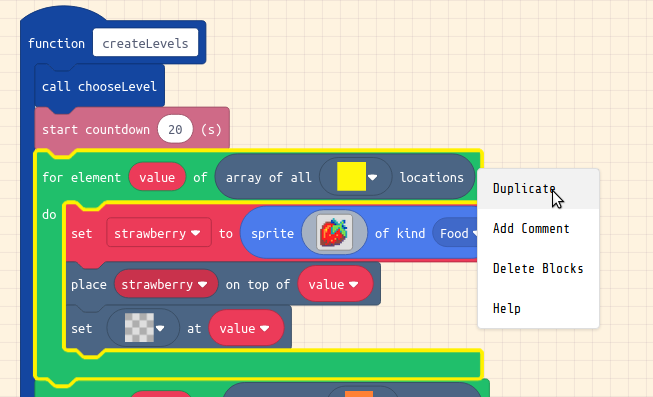
We add enemies like we add food. @fullscreen
Now change the values of content of this ||loops:for loop||. Change the yellow square to a red one.
Change the name of ||variables:strawberry|| for the two blocks for it to mentioned. I’ll choose ||variables:snake|| and change the image too.
Check your code with the example below.
namespace myTiles {
    //% blockIdentity=images._tile
    export const tile0 = img`
        . . . . . . . . . . . . . . . .
        . . . . . . . . . . . . . . . .
        . . . . . . . . . . . . . . . .
        . . . . . . . . . . . . . . . .
        . . . . . . . . . . . . . . . .
        . . . . . . . . . . . . . . . .
        . . . . . . . . . . . . . . . .
        . . . . . . . . . . . . . . . .
        . . . . . . . . . . . . . . . .
        . . . . . . . . . . . . . . . .
        . . . . . . . . . . . . . . . .
        . . . . . . . . . . . . . . . .
        . . . . . . . . . . . . . . . .
        . . . . . . . . . . . . . . . .
        . . . . . . . . . . . . . . . .
        . . . . . . . . . . . . . . . .
    `
    //% blockIdentity=images._tile
    export const tile1 = img`
        5 5 5 5 5 5 5 5 5 5 5 5 5 5 5 5
        5 5 5 5 5 5 5 5 5 5 5 5 5 5 5 5
        5 5 5 5 5 5 5 5 5 5 5 5 5 5 5 5
        5 5 5 5 5 5 5 5 5 5 5 5 5 5 5 5
        5 5 5 5 5 5 5 5 5 5 5 5 5 5 5 5
        5 5 5 5 5 5 5 5 5 5 5 5 5 5 5 5
        5 5 5 5 5 5 5 5 5 5 5 5 5 5 5 5
        5 5 5 5 5 5 5 5 5 5 5 5 5 5 5 5
        5 5 5 5 5 5 5 5 5 5 5 5 5 5 5 5
        5 5 5 5 5 5 5 5 5 5 5 5 5 5 5 5
        5 5 5 5 5 5 5 5 5 5 5 5 5 5 5 5
        5 5 5 5 5 5 5 5 5 5 5 5 5 5 5 5
        5 5 5 5 5 5 5 5 5 5 5 5 5 5 5 5
        5 5 5 5 5 5 5 5 5 5 5 5 5 5 5 5
        5 5 5 5 5 5 5 5 5 5 5 5 5 5 5 5
        5 5 5 5 5 5 5 5 5 5 5 5 5 5 5 5
    `
    //% blockIdentity=images._tile
    export const tile2 = img`
        4 4 4 4 4 4 4 4 4 4 4 4 4 4 4 4
        4 4 4 4 4 4 4 4 4 4 4 4 4 4 4 4
        4 4 4 4 4 4 4 4 4 4 4 4 4 4 4 4
        4 4 4 4 4 4 4 4 4 4 4 4 4 4 4 4
        4 4 4 4 4 4 4 4 4 4 4 4 4 4 4 4
        4 4 4 4 4 4 4 4 4 4 4 4 4 4 4 4
        4 4 4 4 4 4 4 4 4 4 4 4 4 4 4 4
        4 4 4 4 4 4 4 4 4 4 4 4 4 4 4 4
        4 4 4 4 4 4 4 4 4 4 4 4 4 4 4 4
        4 4 4 4 4 4 4 4 4 4 4 4 4 4 4 4
        4 4 4 4 4 4 4 4 4 4 4 4 4 4 4 4
        4 4 4 4 4 4 4 4 4 4 4 4 4 4 4 4
        4 4 4 4 4 4 4 4 4 4 4 4 4 4 4 4
        4 4 4 4 4 4 4 4 4 4 4 4 4 4 4 4
        4 4 4 4 4 4 4 4 4 4 4 4 4 4 4 4
        4 4 4 4 4 4 4 4 4 4 4 4 4 4 4 4
    `
    //% blockIdentity=images._tile
    export const tile3 = img`
        2 2 2 2 2 2 2 2 2 2 2 2 2 2 2 2
        2 2 2 2 2 2 2 2 2 2 2 2 2 2 2 2
        2 2 2 2 2 2 2 2 2 2 2 2 2 2 2 2
        2 2 2 2 2 2 2 2 2 2 2 2 2 2 2 2
        2 2 2 2 2 2 2 2 2 2 2 2 2 2 2 2
        2 2 2 2 2 2 2 2 2 2 2 2 2 2 2 2
        2 2 2 2 2 2 2 2 2 2 2 2 2 2 2 2
        2 2 2 2 2 2 2 2 2 2 2 2 2 2 2 2
        2 2 2 2 2 2 2 2 2 2 2 2 2 2 2 2
        2 2 2 2 2 2 2 2 2 2 2 2 2 2 2 2
        2 2 2 2 2 2 2 2 2 2 2 2 2 2 2 2
        2 2 2 2 2 2 2 2 2 2 2 2 2 2 2 2
        2 2 2 2 2 2 2 2 2 2 2 2 2 2 2 2
        2 2 2 2 2 2 2 2 2 2 2 2 2 2 2 2
        2 2 2 2 2 2 2 2 2 2 2 2 2 2 2 2
        2 2 2 2 2 2 2 2 2 2 2 2 2 2 2 2
    `
}
let snake: Sprite = null
  for (let value of tiles.getTilesByType(myTiles.tile3)) {
        snake = sprites.create(img`
            . . . . c c c c c c . . . . . .
            . . . c 6 7 7 7 7 6 c . . . . .
            . . c 7 7 7 7 7 7 7 7 c . . . .
            . c 6 7 7 7 7 7 7 7 7 6 c . . .
            . c 7 c 6 6 6 6 c 7 7 7 c . . .
            . f 7 6 f 6 6 f 6 7 7 7 f . . .
            . f 7 7 7 7 7 7 7 7 7 7 f . . .
            . . f 7 7 7 7 6 c 7 7 6 f c . .
            . . . f c c c c 7 7 6 f 7 7 c .
            . . c 7 2 7 7 7 6 c f 7 7 7 7 c
            . c 7 7 2 7 7 c f c 6 7 7 6 c c
            c 1 1 1 1 7 6 f c c 6 6 6 c . .
            f 1 1 1 1 1 6 6 c 6 6 6 6 f . .
            f 6 1 1 1 1 1 6 6 6 6 6 c f . .
            . f 6 1 1 1 1 1 1 6 6 6 f . . .
            . . c c c c c c c c c f . . . .
        `, SpriteKind.Enemy)
        tiles.placeOnTile(snake, value)
        tiles.setTileAt(value, myTiles.tile0)
    }
Create a Collision Listener @fullscreen
We now code what happens when our player overlaps with the enemy ||variables:snake||.
Drag in an on player overlap with block from Sprites. Set the second value to be Enemy.
Inside the block drag in from Game block of ||game:game over|| and keep it set to Lose.
sprites.onOverlap(SpriteKind.Player, SpriteKind.Enemy, function (sprite, otherSprite) {
    game.over(false)
})
Test your game and Next Steps
Test your game and Next Steps @unplugged
This tutorial is now complete.
You can test your game to check that each time you add in a red block in your level tilemaps an enemy appears and that when you touch the enemy the game ends with a Game Over message.
For example: you may want to learn how to do the following
- Add player lives
- Add moving enemies.
This tutorial is one of many allowing you add different Game Element on the home page of this Platformer Making Course.